
The new phone takes photos that are much better than the old phone. Only problem so far is I can’t figure out how to send a message along with a photo!
The new phone takes photos that are much better than the old phone. Only problem so far is I can’t figure out how to send a message along with a photo!

The miniature view looking down from the bell tower of Notre Dame in Paris on Cafe Panis and the Seine. It looks even better viewed large.
As an added bonus, if you click that large link, you will see the image using the uber cool and fabulous Lightbox Plugin that I just found thanks to Jenn. That was THE fastest and the easiest plugin I have ever installed here and it is SO neat! (It isn’t as neat if you’re using Internet Explorer. It has glitches, I discovered when I called my Mom to show it off to her. Sorry about that. It works in Firefox.)
Inspired by Arkworld, I had to try my hand at Fake Model Photography. Beware – it is addicting once you get started! But so much fun!
Back to studying Trig for me. I needed a little mini break (pardon the pun), but I’m trying to be good about getting ready for this test. It is so hard and I’m so confused. *sigh*
On a positive note, the change in my meds has been a huge help. I went from a D on my first Chemistry test to an A on the second one. (She drops our lowest grade out of 7 tests, so no worries there.) I went from a C on my first lab practical in Biology to a high B on the second one, and a D on the first Biology test (brought up to a C thanks to extra credit) to a B on the second one (brought up to an A thanks to extra credit.)
I’m afraid Trig won’t go as well though – it is the only class that truly builds from one chapter to a next. I strugged to get through chapters 1 & 2 while on the meds, so now I barely remember it for chapters 3 & 4. I think I may be taking a do-over in this class. I really don’t want to kill my GPA just because I was jacked up on the wrong medicine for the first month of the semester.
I wrote this on Tuesday, but before I could publish it the laptop died. I forgot to post it when I got home that night – oops! It has been a crazy week.
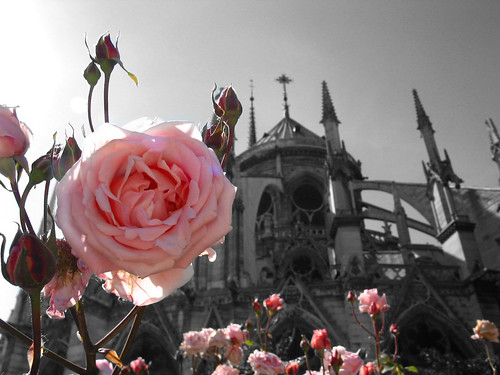
I’ve been meaning to write this for awhile, and since I am at my Photo I class without anything to develop (stupid winter weather and gray days outside), I decided it was a good time to write up my tutorial on how I created the colorized images I’ve posted recently, but if you want to do these cutouts, then check out these Photo Cutouts services.
Step 1 – Open up the image you want to color in Photoshop. (I use Photoshop CS2. I’m sure you can do this in other software, but I don’t know how. So these are the steps I do in Photoshop CS2.)
Step 2 – Convert the image to B&W using your preferred method. I use the Channel Mixer. Be sure to click the “Monochrome” checkbox, and set the Red, Green and Blue channels. I set this one to Red 60, Blue 20, and Green 32. Some people say you should make sure the numbers add up to 100. Others recommend settings similar to what I use. In the end, it is all about what looks best to you.
Step 3 – Set the color for the paintbrush to black for the foreground and white for the background. “Paint” over anything you want in color with black and – bam! – the color will appear! If you accidentally paint over something you don’t want in color, switch your paintbrush to white and paint over it again and it will go back to black & white again.
That’s it! I change the paintbrush settings to larger settings to make it faster to color, and I change it to very fine pinpoint to get into small places. Save it when you’re done (don’t save over the original if you want to keep it in color!) and enjoy!
Oh my goodness. This is SO COOL. You can make a pinhole camera that uses 35mm film with a Matchbox! Check out the directions. I know what I’m doing this weekend! (Inbetween taking tests, knitting, watching the Olympics and studying. You know, in all my spare time.) [via ReadyMade Blog.]
Speaking of studying – I have my first Biology lab practical tomorrow. I’m terrified. I have to know Phylums and Genus names for a ton of itty-bitty things. (Bacteria, molds, fungus, algae, etc.) The test will be timed and is something like 150 questions long. I’m freaking out. There is no way. No way! I guess if I go back to reviewing the CD of images instead of reading about pinhole cameras, that might be a good start though. Sigh.
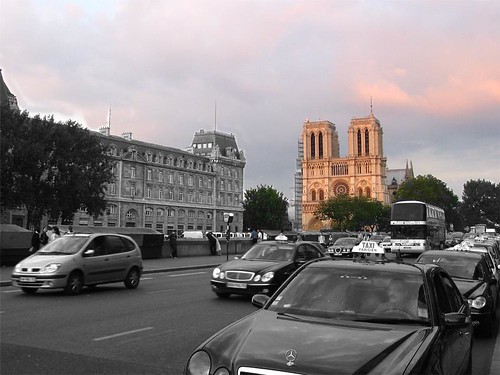
I am finally adding photos from our first evening in Paris on our honeymoon back in June, 2004 to Flickr. I still have to post the photos I took of the doors of Notre Dame, but I’ll do those tomorrow. They may be boring to everyone else, but the door on the far left with the statue of St. Denis holding his head and the angel comforting him is priceless. I love church architecture, and those doors are amazing.
Actually, the whole Notre Dame Cathedral is pretty amazing. Just think of the centuries it took to build it; the generations of families that worked on it. The hard labor involved in making all of the carvings on such an ornate building. We loved it so much we visited it every day that we were in Paris.
I have finally learned not only how to convert a photo to Black & White in Photoshop, but how to make part of it be in color. Whee! I had so much fun playing with the technique that I keep looking for photos to try it on. I don’t have many pictures on the laptop though, so I’ll have to find some more to play with this weekend.
Oh! I realized after reading Elle’s comment from earlier, I should clear something up – Feedburner just serves my RSS feed; you don’t have to change what reader you use, I was just hoping to have people change the feed they are downloading. I added a “Add to Google” button in the sidebar, and I can add the My Yahoo! option and others if anyone needs them.
Below are some of my favorites from the Paris, Day 1 photoset:


